AI conversations
Info
Who can use this feature?
- This feature is available for all users
What are AI conversations?
An AI conversation is a complete interaction between a customer and your AI assistant, from first message to resolution.
An AI conversation is the billing unit used to measure your AI usage.
Key points:
- AI conversations are counted based on completed interactions, not individual messages
- Only conversations with actual AI responses count toward usage
- Each conversation is counted once, when it ends
- System messages and welcome messages don't count toward usage
When does an AI conversation start or end?
Conversation starts when:
- Customer sends their first message
- AI assistant responds
- A new inquiry begins (after reseting previous conversation)
Conversation ends when:
- Customer ends session
- Customer click to reset conversation
- Conversation is marked as resolved
We count complete customer interactions from start to resolution.
Customer: "Do you have this in medium?"
AI: "Yes, available in medium!"

Customer: "What's the material?"
AI: "100% organic cotton."

Customer: "Perfect, thanks!"
AI: "Happy to help!"

> Total:  1 AI conversation used
Why AI conversation matters
Predictable: 1 customer issue = 1 conversation
The most common feedback: "I can't predict how many AI replies I'll use." With conversations, you know exactly: 1 customer = 1 conversation. Easy to forecast.
Easy to budget and forecast
When you count replies, one chatty customer could use 15 replies. With conversations, that same customer = 1 conversation, regardless of how many messages they send.
Meaningful tracking
"AI sent 327 replies this month" doesn't tell you much. "AI handled 127 complete customer conversations with 85% resolution rate" tells you:
- How many customers AI helped
- How well AI performed
How AI conversations are counted
An AI conversation is counted when all these conditions are met:
1. Conversation has at least one valid AI response
| ✅ Valid AI responses | ❌ Invalid AI responses |
|---|---|
| Come from your trained data sources (FAQs, products, custom training) | AI welcome messages |
| Successfully answer customer questions | Suggested questions (conversation starters) |
| Not error messages or system notifications | AI responses without data sources |
| AI error messages | |
| System or internal messages |
2. Conversation meets interaction requirements
Requirements vary based on how the conversation started:
| How conversation started | Requirements |
|---|---|
| If conversations initiated by customers | Customer opens chatbox and sends first messageAI responds with at least one valid response |
| If conversations initiated by proactive chat | Customer must reply to the proactive messageAI must respond with at least one valid response |
3. Conversations reach completion
- Manually resolved by team member
- Auto-resolved after inactivity (based on your automation settings)
- Customer resets conversation in chatbox
- Session expires (after 3 days)
- Conversation is deleted
- Conversation is blocked
When AI conversations are NOT counted ❌
1. No AI response
- Conversation has no AI replies at all
- Customer sent message but only human agent responded
- Conversation was transferred to human before AI could respond
2. Auto-blocked conversations
3. Initiated by proactive chat with no engagement
- Proactive message was displayed
- Customer didn't respond or interact
- No two-way conversation occurred
4. Only excluded mesages: welcome message, suggested questions, system messages
What is a session?
A session is a time window that groups related customer interactions:
- Maximum duration: 5 days
- Automatically expires after 5 days of inactivity
- Can contain one or multiple conversations
- Used to determine when conversations end
How sessions affect conversation counting
Within a session (under 5 days):
- New messages continue the current conversation
- No new conversation is created unless previous one is resolved
After session expires (over 5 days):
- Any new message creates a new conversation
- Previous open conversation automatically ends
- New conversation starts fresh count
Plan limits
Each Chatty plan includes a different monthly AI usage
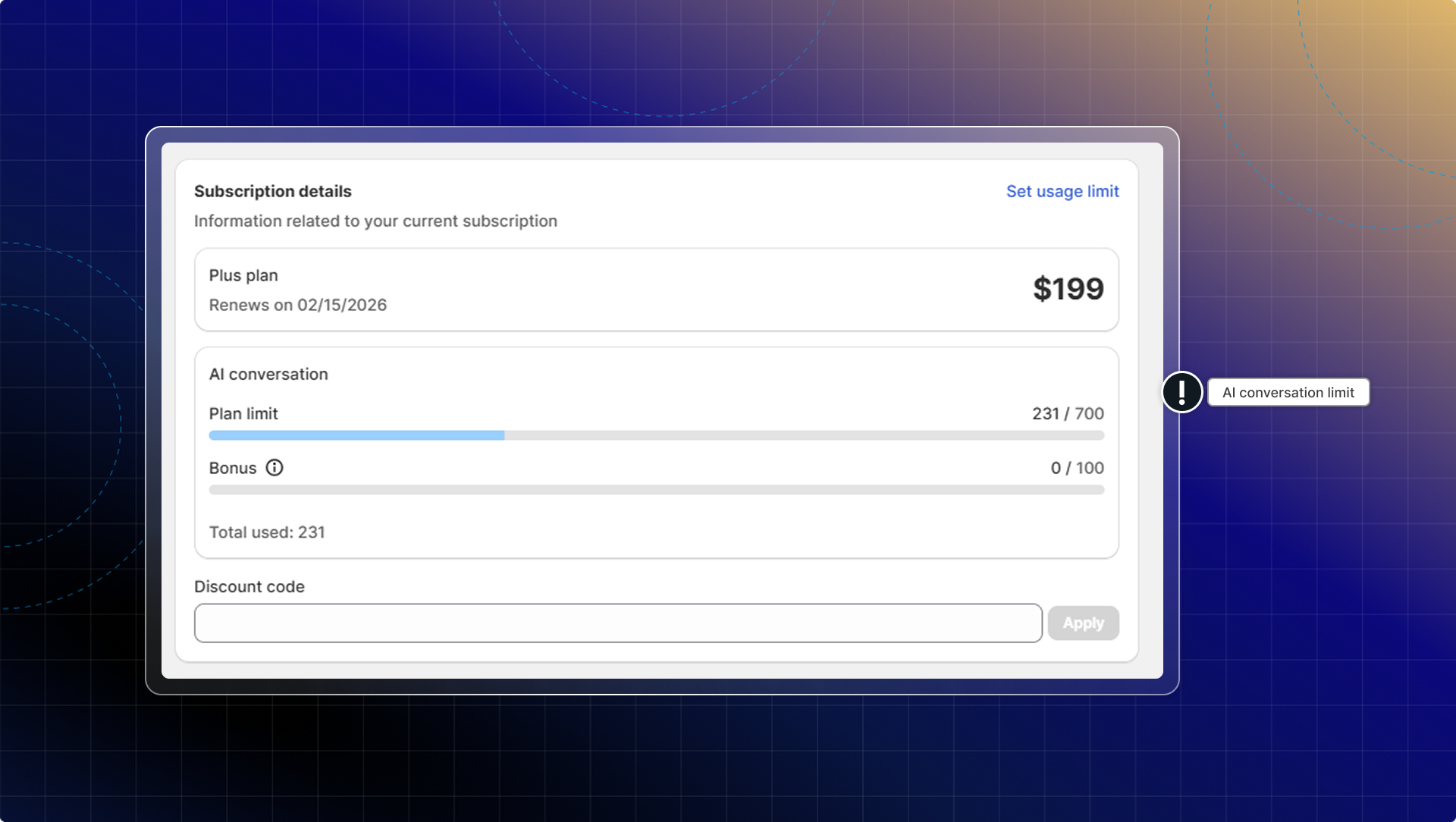
| Free | Basic ($19.99) | Pro ($68.99) | Plus ($199) | |
|---|---|---|---|---|
| AI conversations | 50 (lifetime) | 50 | 300 | 700 |
| Additional usage | ✖️ | $0.4/conversation | $0.4/conversation | $0.4/conversation |
How to check AI conversations left this month
- Go to Subscription
- In Subscription details, check AI conversation
- View your current usage
Info
- Usage resets on your billing cycle date, not calendar month
- You will get email notifications when you reach 80% and 100% of your limit
How to set AI usage limit
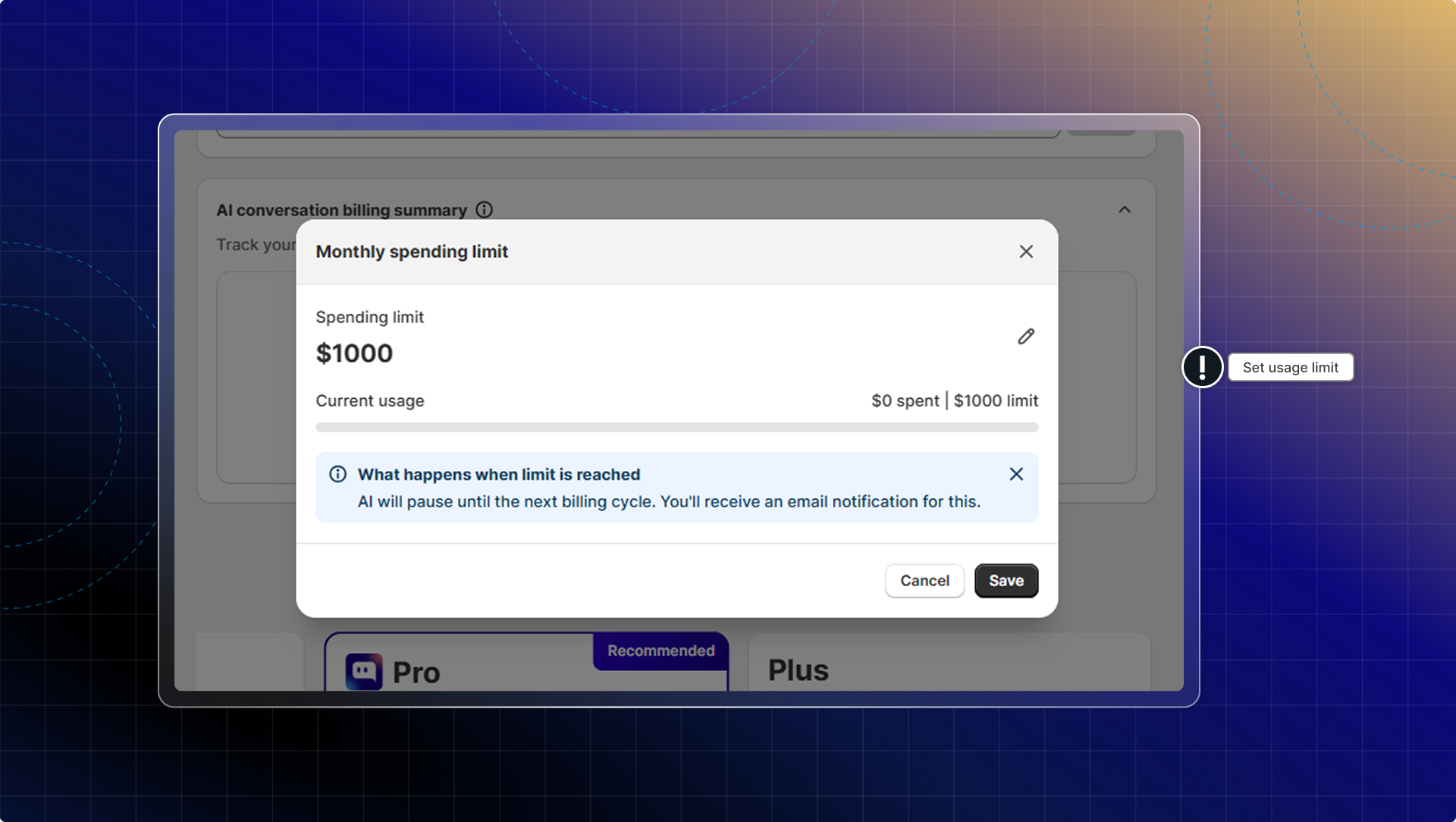
Setting an AI usage limit helps control spending on additional AI replies.
- Go to Subscription
- Click Set usage limit
- Click Edit
- Enter your budget limit
- Click Save
What happens when limit is reached
- AI stops responding to new conversations until next billing cycle
- Human agents can still handle existing conversations
- All other features continue working normally
- Limit resets automatically each billing cycle
Pro tip: Set your limit 15-20% above expected usage to handle busy periods without interrupting customer service.
FAQs
How many messages equal one AI conversation?
One conversation can contain any number of messages. Message count doesn't determine conversation count. What matters is:
- Did the conversation start?
- Did AI provide at least one valid response?
- Did the conversation end?
A conversation with 1 AI message counts the same as a conversation with 10 AI messages.
Do welcome messages count toward AI usage?
No. AI welcome messages don't count as valid AI responses. Only responses that come from your trained data sources count toward usage.
Does transferring to a human agent still count as an AI conversation?
Yes, if AI provided at least one valid response before the transfer. The conversation counts because AI was used, even if a human completed it.
What happens if I delete a conversation?
Deleted conversations that had valid AI responses are still counted toward usage. Deletion ends the conversation at the time of deletion, and the count is recorded.
If a conversation stays open for days, when is it counted?
The conversation is counted when it ends, not when it starts. If a conversation stays open for 3 days, it's counted when:
- You manually resolve it, or
- The 3-day session expires and auto-ends the conversation